Short answer: which kind of tool fits which requirement
If you need one survey programme across email, chat and SMS, or want results pushed into BI and CRM tools, an external platform such as Simplesat fits that requirement. If you want the survey on the Jira request, invitations controlled by your own Jira Automation conditions, and results filtered by the Jira fields your team already maintains, an app that runs inside Jira fits better. AdaptiveSurvey is the second kind.
Kinline develops AdaptiveSurvey, so we have a stake in this comparison. Everything said about Simplesat below is attributed to Simplesat’s own Jira integration page and pricing page, and you should confirm it with the vendor before deciding.
| Requirement | Simplesat (as Simplesat describes it) | AdaptiveSurvey |
|---|---|---|
| Where the survey lives | Embedded in JSM resolution emails, with an optional Simplesat app that shows feedback on issues | Below the request comments in the JSM portal |
| Survey formats | CSAT, CES, NPS and 5-star surveys with follow-up questions | Question ratings (up to 8 separately rated questions) or Experience indicators (one overall rating plus selectable reasons), on a 1–5 or 1–10 scale shown as stars or numbers |
| Invitation control | Delay and suppression settings in its platform | Jira Automation conditions you configure |
| Reporting | Its own dashboards; sends data to other tools | Dashboard filtered by Jira fields, plus CSV export |
AdaptiveSurvey vs Simplesat: how each connects to Jira and who sees the data
Simplesat says you link Jira to its platform with API credentials, embed a survey in JSM resolution emails, and optionally install its Jira app so ratings, comments and tags show on the issue. It also says feedback posts back as an issue comment or internal note, can sync to custom fields and feeds its dashboards, and that a Jira admin is needed for notifications and the app install.
AdaptiveSurvey is a Jira Cloud app. The invited requester answers below the comments of the original request in the portal, so they can reread the conversation before rating. Agents then see the submitted score on the issue. The Marketplace listing describes Atlassian-hosted storage and project permissions.
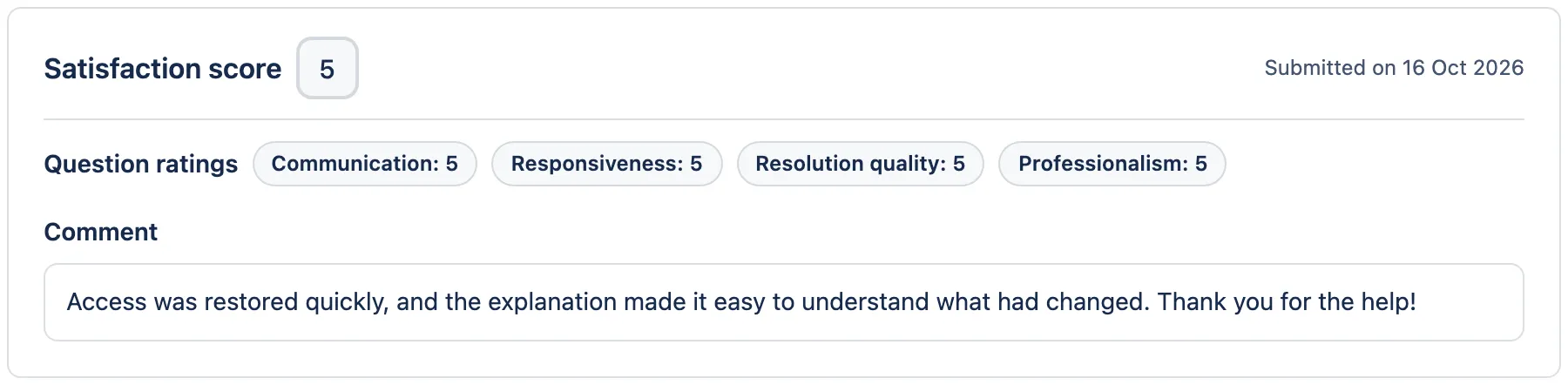
The access model matters if you need anonymous collection. In AdaptiveSurvey the requester signs in to the portal, each issue takes one submission, and the survey is completed in the portal even when the invitation arrives by Slack. Simplesat says its email ratings open in the browser without a login. If anonymous or non-portal responses are a requirement, weigh that first.
Survey formats: stars, question ratings and experience indicators
AdaptiveSurvey keeps the familiar five-star rating available and widens it where a team needs more detail. Under Configure → Survey form you choose one of two forms, a scale (1–5 or 1–10) and a style (stars or numbers). Numbers on 1–10 is the default.
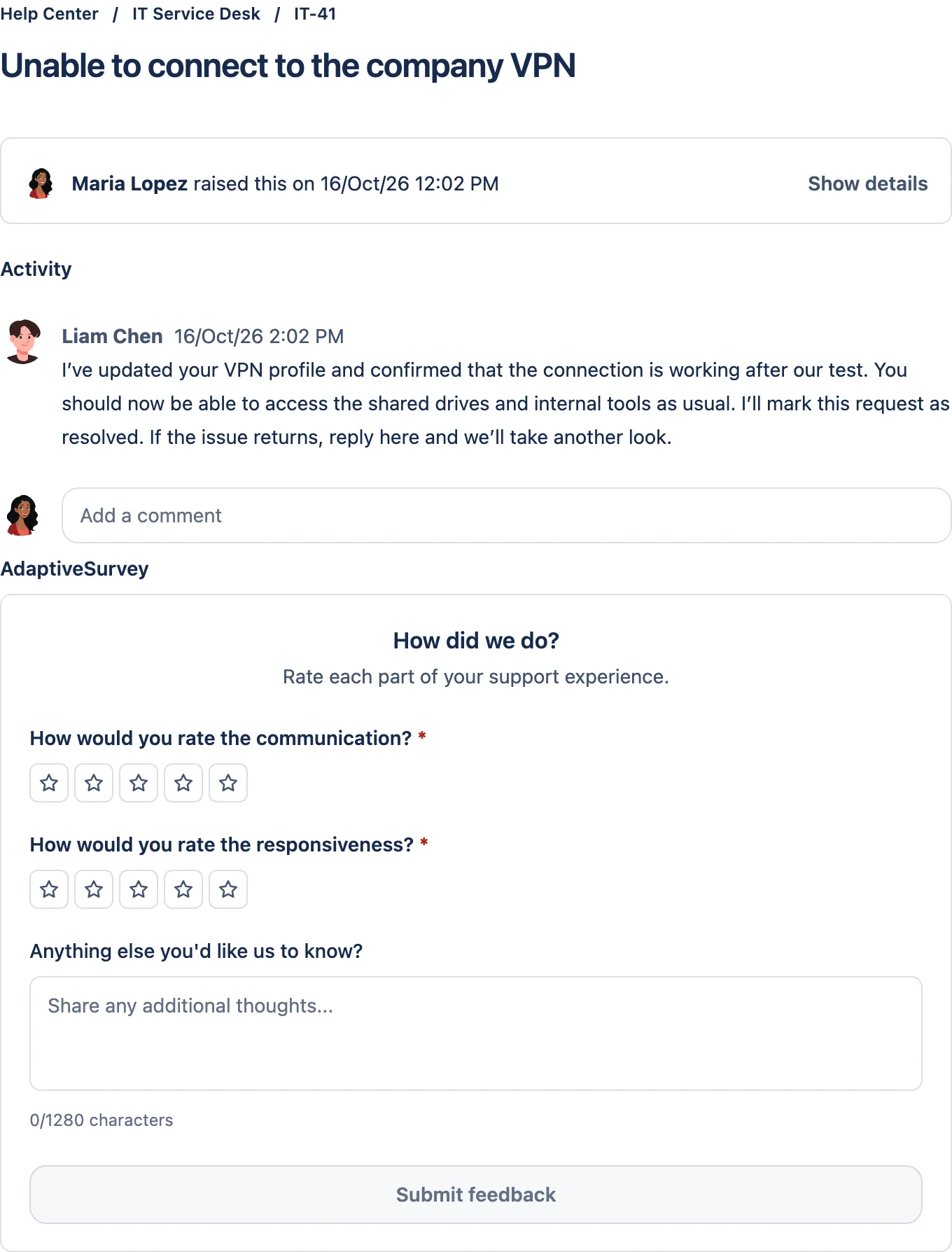
Question ratings asks for a separate rating per question, such as communication, responsiveness or resolution quality. The Marketplace listing says up to 8 questions are supported, each with its own score on the dashboard. The overall score is the average of the answers, rounded to two decimals. The default question set also includes ease of getting help, and the wording is editable.
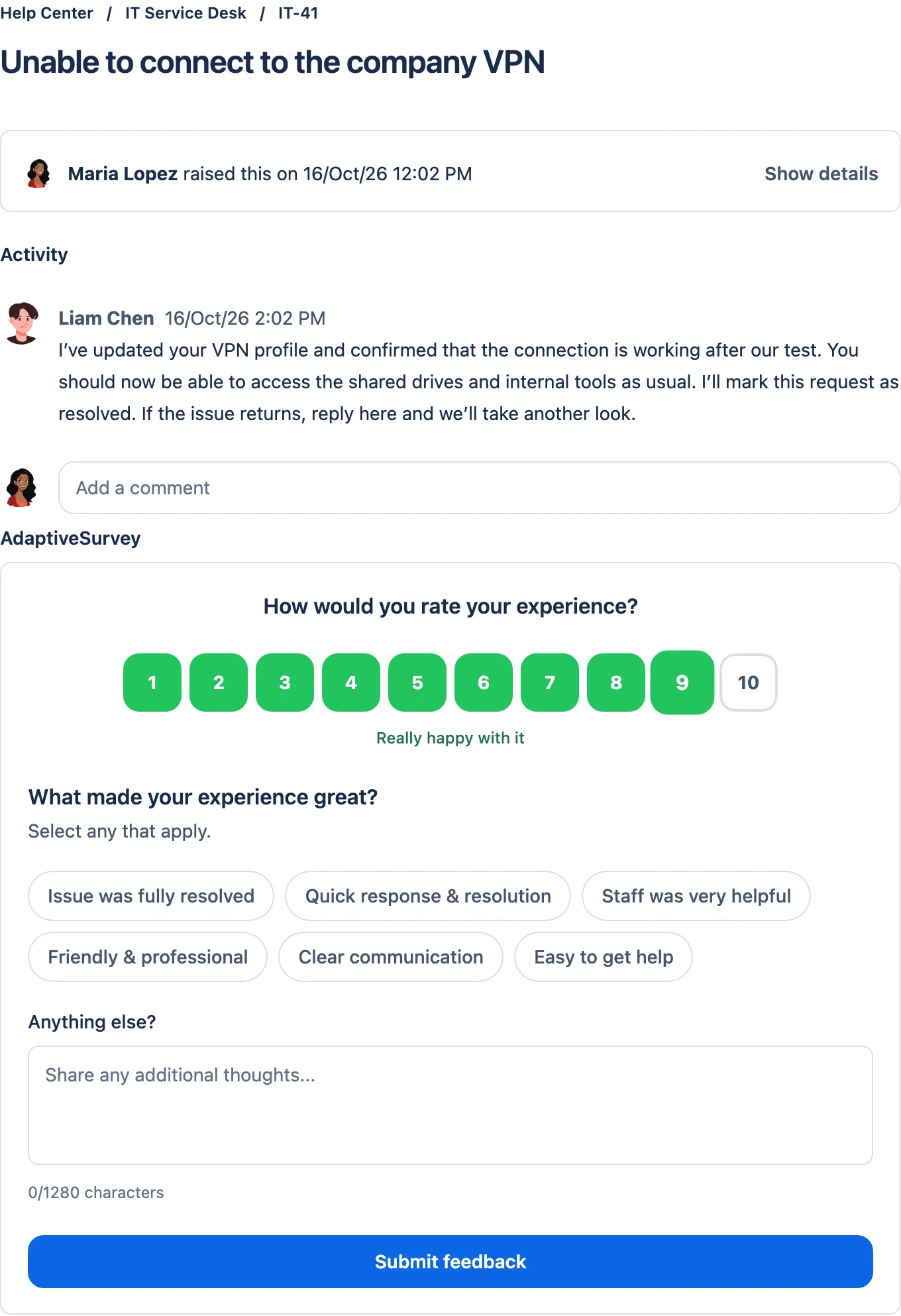
Experience indicators asks for one overall rating, then offers reasons that match it, such as what went wrong, what could be better or what made it great. You set 3–8 indicators per rating band and track the most selected ones on the dashboard, so the reasons behind a score are reported alongside the score itself. The same form works on a ten-point numbered scale, as shown below.
Wording, translations, score labels, targets and score bands are all configurable, so the survey can match your team’s interpretation of a good score. Lost Time, which asks customers how much working time a request cost them, is also available.
Simplesat lists CSAT, CES, NPS and 5-star surveys, with follow-up questions, conditional logic and branding. If you need to run an NPS or CES programme across several channels, that is the breadth to evaluate there. A 1–10 rating in AdaptiveSurvey is a satisfaction rating, not an NPS survey, so choose accordingly if NPS comparability is a hard requirement.
Simplesat’s page also includes its own comparison against JSM’s native surveys. That is Simplesat’s view of Atlassian’s product, so check what your Jira plan includes in Atlassian’s documentation.
Delivery control and timing
With AdaptiveSurvey you control invitations through Jira Automation. The documented email rule works like this:
- Trigger on a work item transition to the resolved status your workflow uses (a Done-category status).
- Add a condition that checks the survey has not already been sent, plus any conditions your process needs, such as country or organization.
- Set the
kinline-adaptive-surveyentity property, which records when the survey was sent and makes it available in the customer portal. - Send a customized email to the Reporter, using the wording copied from AdaptiveSurvey.
Slack delivery follows a similar rule, and the survey is still completed in the portal.
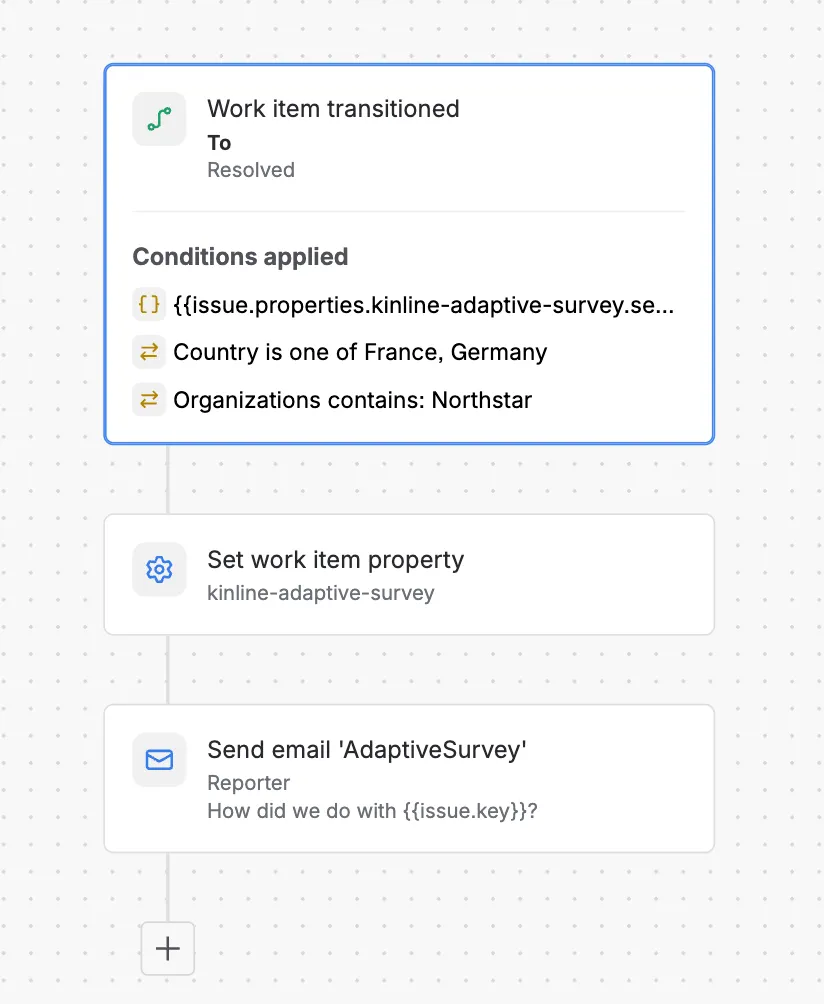
The rule above is one example configuration: it invites reporters only for requests from selected countries and one organization. Those values are examples, not AdaptiveSurvey settings; you replace them with your own Jira conditions. Building and turning on the rule is part of getting this control, and you need permission to create automation rules in the space.
On timing, Simplesat says you can set a delay so surveys go out only after an issue is truly resolved, and that suppression rules stop people being surveyed too often. If you need a delay, reminders or suppression with AdaptiveSurvey, they would be additional rules you configure and test in Jira Automation. Simplesat’s help center also indicates surveys can be sent from Jira automation rules, so rule-based sending is not unique to either option; the difference is where the survey is hosted and answered.
AdaptiveSurvey vs Simplesat: reporting by Jira context
An overall average can hide a single office, priority or customer group. AdaptiveSurvey’s dashboard filters use Jira’s own context:
- Common filters: Agent, Group, Team, Question, Score, Indicator, Comment and Lost time.
- Jira fields: Type, Priority, Reporter and supported custom fields in the selected project.
- Include or exclude modes for supported issue filters, and date ranges from Today to 1y.
For example, a manager can include only High priority requests, then read the matching comments and linked tickets. With a supported Location select field, the same approach shows whether low communication scores are concentrated in one office.
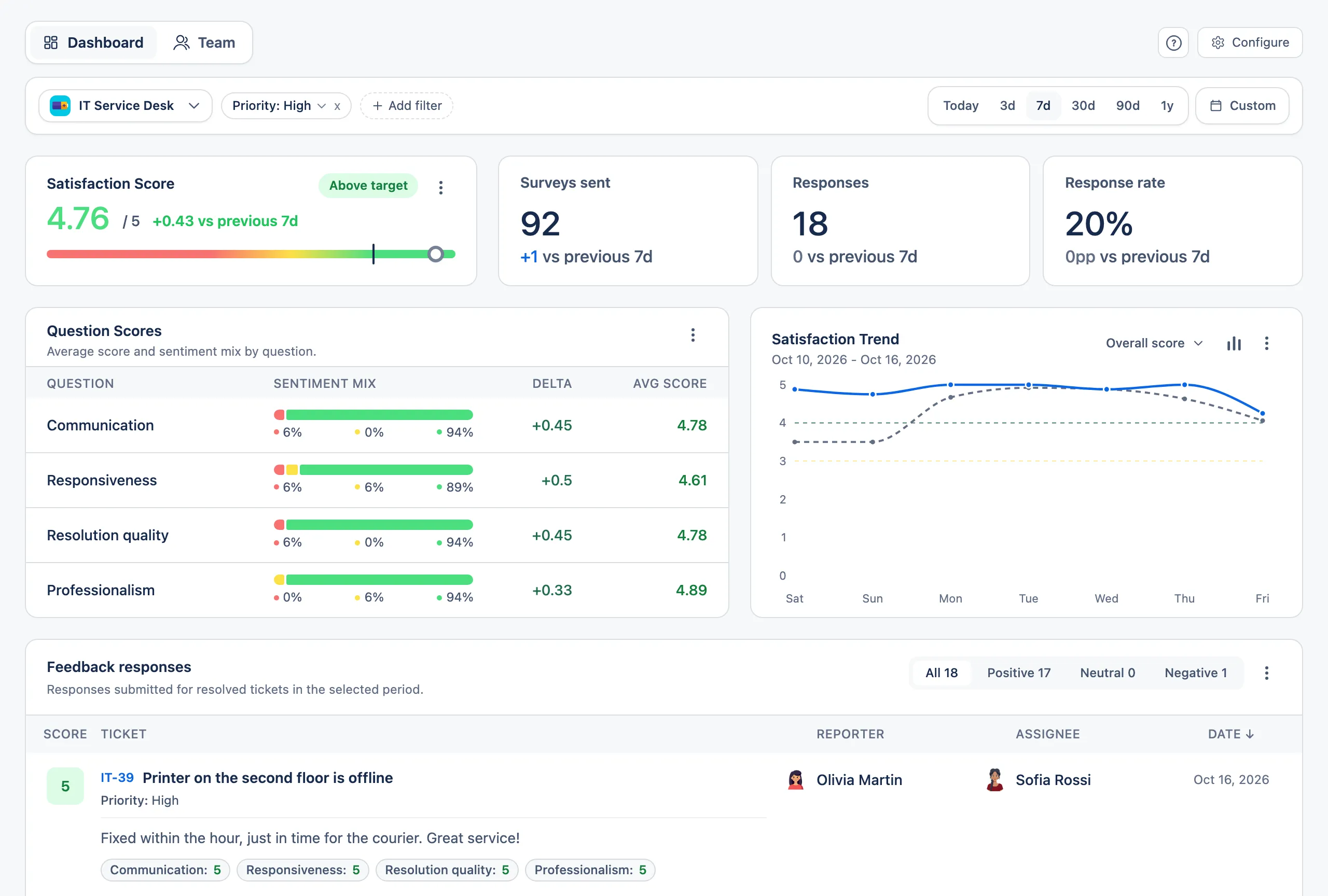
Supported custom fields are select, cascading, checkbox and user-picker fields; text, date, number and Assets fields are not available as filters. Type means the Jira work type, not the JSM request type. When the filters show a pattern, Download CSV on the Feedback responses list exports all matching responses across pages, with selected Jira fields and full comments, for a service review. It is a manual export, not a live feed. For a worked example of filtering by office or customer type, see Jira CSAT by team, country or customer type.
Simplesat says each response arrives with ticket context such as priority, assignee, requester and custom fields, that it reports by agent, team and company, and that it pushes feedback to 100+ tools including Power BI. If a live feed into BI or CRM systems matters more than staying inside Jira, that is the stronger fit.
A buyer checklist
Ask these before a trial.
For both
- Which survey formats do we need now: star ratings, several rated questions, reasons behind a score, or an NPS or CES programme?
- Must respondents be anonymous or answer without signing in?
- Which Jira fields do we need for reporting, and are they supported (for AdaptiveSurvey, a supported custom field type)?
- Do we need results in Jira only, or pushed live to other systems?
- How will we handle historical responses? Keep an export from the current tool; AdaptiveSurvey’s CSV export covers its own responses and is not an import.
For Simplesat
- Where are responses stored, and what do its Trust Center and DPA terms say?
- Does it support Jira Data Center, if that applies?
- Which Jira features need the Simplesat app and which only the email embed?
- Its pricing page lists plans by monthly response volume and account users. Which plan covers our expected responses and the delay, resend and language features we need?
For AdaptiveSurvey
- Who will own the Jira Automation rule, and which conditions should select requests?
- Do we need delays, reminders or suppression? These require extra rules you configure and test.
- Are we on Jira Cloud?
When the checklist points to Jira-hosted, request-level feedback, you can see the formats and delivery options on the AdaptiveSurvey Marketplace listing and try them in a test project.